Best tools for getting client approval and sign-off on social media posts (2026)
 By Grig K.
- Judge an approval tool by what the client has to do — account, taps, language, record — not by what the dashboard does for you.
- No-login is now common (Gain, SocialPilot, Agorapulse, Sprout) — but Planable's and Later's no-login links only comment; they can't actually approve.
- Client-facing language is the rarest feature here: only Agorapulse documents it, and only partially.
- A "yes" that lives inside a vendor's database — or a chat screenshot you can edit — isn't a record you can show later. That's the gap most tools leave.
If all you need is the client to look at a post and say yes, a full suite is a lot of tool — and friction on the one person you want it easy for. This compares them on the approval job alone: does the client log in, how fast is the yes, can they do it in their language, and does the yes leave a record you could show later.
For years I was on the client side of these approvals — the one signing off on agencies' and freelancers' work — and the login was almost always why I put it off, not the decision. That's the lens here: what the client has to do, not what the dashboard can do for the manager.
What actually matters when the job is just client approval
Four things decide whether an approval tool helps or quietly costs you a round:
- Does the client need an account? Every login, invite, or password is a reason a busy client puts it off.
- How many taps to a yes? One clear button beats a dashboard the client has to learn.
- Can they approve in their language? If your client reads Arabic or Portuguese and the screen is English, "approved" is a guess.
- Does the yes hold up later? An internal "Approved" flag lives inside the vendor's database; a dated record you can show a client who later says "I never agreed to that" is a different thing.
Tools have increasingly solved the first; almost none deliver the last.
How the main tools compare on approval
| Tool | Client needs an account? | One-tap approve? | Client's own language? | Independent dated proof? | Approval starts on |
|---|---|---|---|---|---|
| Planable | Yes — a public link can only view/comment; approving needs a "Client" member (help.planable.io) | Not stated as one-tap | No (English app) | Internal status/history only | Pro ($49/mo) |
| Later | No login for the external link — but it's for comments, not a binding approval; approval "doesn't block publishing" (help.later.com) | No | Not documented | No | Growth (~$37.50/mo yearly) |
| Loomly | Invited client sets up access/login | Not stated | Not documented | Self-exported PDF of status, not signed | Starter ($49/mo yearly) |
| Sprout Social | No account — verifies email, first-time name/timezone (support.sproutsocial.com) | No — approve/reject from a list | Not documented | Internal only | Advanced ($399/mo) |
| Hootsuite | No public client-facing approval link documented — internal reviewers approve via team permissions (hootsuite.com) | No | No | Internal | Advanced ($399/mo) |
| Agorapulse | No account — emailed Shared Calendar link (60-day token) | Not stated | Partial — a display-language setting for external users | No | Advanced ($149/mo yearly) |
| Gain | No login — "magic" link, no password (link expires in 24h) (help.gainapp.com) | Yes — "one-click approvals" (gainapp.com) | Not documented | Internal activity tracker / PDF report | Starter ($99/mo yearly) |
| SocialPilot | No login — "Approve On-the-Go" link | Yes — one click (socialpilot.co) | Not documented | No (status only) | Premium ($100/mo) |
Two adjacent creative-proofing tools, Filestage and Ziflow, go further on proof: Ziflow can export a timestamped audit trail, and both add e-signatures on their higher tiers (Filestage from its Business plan, Ziflow on Enterprise). But their entry paid plans start around $199/mo (Filestage priced in euros), and they're built for creative files, not social posts (ziflow.com, filestage.io).
Comparison based on each vendor's public help docs and pricing pages, checked July 2026. "Not documented" means we found no public evidence of the feature — not proof it's impossible.
Does the client really have to sign up?
Increasingly, no — and that's the biggest shift since a few years ago. Gain, SocialPilot, Agorapulse and Sprout all let a client act without a standing account. But read the fine print, because this is the catch most people miss: Planable's no-login public link can't approve at all — it only views and comments, and the actual approval needs the client added as a member (help.planable.io). Later's external link is comment-only too, and its approval status "doesn't block publishing," so a post can go live whether or not anyone approved (help.later.com). If your goal is a real gate before publish, check that the no-login link can actually approve, not just comment.
Can the client approve in their own language?
English is a first language for only about 5% of the world, and even counting second-language speakers, Ethnologue's data puts the total near 1.5 billion — under a fifth of the planet (ethnologue.com). Yet client-facing language support is the rarest thing on this list. Of the eight social tools compared here, only Agorapulse documents a client-facing display-language setting — and even that is partial. None of the others — including Gain — publish evidence that the approval screen the client sees is translated into the client's language; Planable's "multi-language" feature is about targeting posts by audience, not translating the interface (help.planable.io). For managers with international or non-English-speaking clients, that gap is the difference between a confident yes and a polite guess.
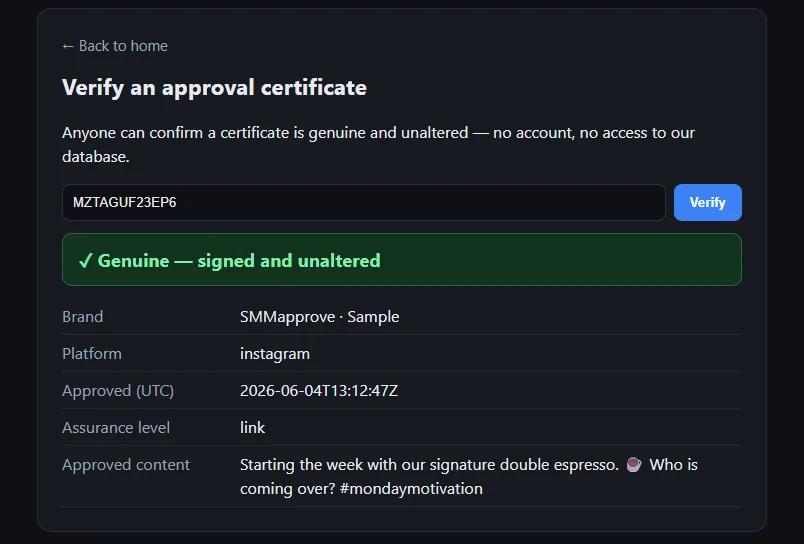
This is the corner SMMapprove was built for — not another dashboard, but the two stalls the table above keeps hitting: a login the client won't make, and a yes you can't point back to. One link, the client taps Approve from their phone with no account, on a screen in their own language (19 supported) — no back-and-forth in a chat thread. It's $9 a month flat, every client included, with no per-seat price that climbs as your client list grows. Each approval is also saved as a dated record you can pull up if it's ever questioned (a live one here), though most managers never need to. It is deliberately not a scheduler, analytics tool, or CRM — for those, keep one of the suites above. SMMapprove only replaces the chase for "yes," which is exactly why it can keep that job this cheap and this simple.
Isn't a chat screenshot good enough?
Usually it's the free default, and often it's fine. But it's worth knowing the limit: WhatsApp, Instagram and Messenger all let the sender edit or delete a message after it's sent (faq.whatsapp.com), so a "looks good 👍" from three weeks ago can change or vanish before you'd ever need it. Inside the paid tools, "approved" is a status in the vendor's database; Loomly and Gain can export a self-generated PDF; only the enterprise proofing tools (Filestage, Ziflow) produce a record a third party could independently check. For many managers a status flag is plenty. If client disputes are a real risk for you, the useful question for any tool — or any chat thread — is simply: could I show a dated record of exactly what this client approved?
How to choose in four steps
- Start from the client, not the dashboard. Pick the tool whose approval link needs no account and works on a phone — that single choice removes most stalls.
- Confirm the link can approve, not just comment. Ask or test it; two tools above only allow comments on the no-login path.
- Match the client's language. If any client isn't a native English reader, weight language support heavily — almost nothing here offers it.
- Decide if you need proof. If a client has ever disputed work, choose a tool that gives you a dated, independently checkable record; if not, a simple status flag is fine.
FAQ
What's the cheapest way to get client approval on social posts?
The suites bundle approval into mid-tier plans from roughly $37 to $100+ a month; a standalone approval layer like SMMapprove is $9 flat with every client included, because it does only approval and nothing else.
Can a client approve a post without creating an account?
With several tools now, yes: Gain, SocialPilot, Agorapulse, and Sprout all support it. Not all, though — Planable and Later's no-login links only allow comments, not a binding approval. Verify the link can actually approve.
Which tool is best for non-English clients?
Client-facing language support is scarce: only Agorapulse (partial) documents it among the major suites. A dedicated approval layer like SMMapprove shows the approval screen itself in the client's language, which is the gap for international rosters.
Do I need a full scheduler just to get approvals?
No. If you already post another way — or your suite's approval is clunky or costs a seat per client — a dedicated no-login approval layer covers the job on its own; keep the scheduler for scheduling.
Writes about client approvals, sign-off and disputes in social-media work — the everyday spots where a 'yes' goes missing and someone gets blamed. More from Grig K. →